
Aquarium project: Upper Elementary
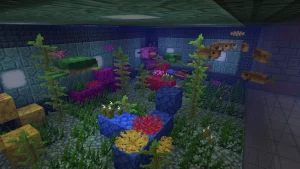
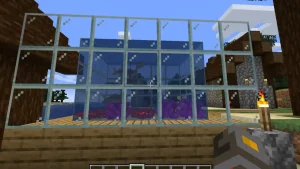
Example of Aquariums

Video
Video script
Welcome to Minecraft Ecosystem builder:
In this activity, you’ll be using Minecraft to create an ecosystem, specifically an aquarium project!
- First, create a new world and name it “aquarium” in creative mode. Choose the “infinite world” option and scroll down to turn on “always day” and turn off “weather cycle.”
- When you spawn into the world, hit the space bar twice and then hold it down to fly up. Use the W, A, S, and D keys to move around and find a spot with light blue water, which is good for seagrass and coral since it’s warm water.
- Hit the space bar twice again to get back down to the water. Dive underwater and use the W, A, S, and D keys to explore. You might see underwater creatures like squid, fish, seagrass, and if you’re lucky, coral.
- Tell your coach or teacher what you found under the water.Remember you going to create an aquarium just like what you see under water.
- Now it’s time to make the aquarium! Fly up again by hitting the space bar twice, and find a nice flat area on the land.
- Press the “E” key on your keyboard to open the inventory. Click on the magnifying glass and search for “glass.” Drag the glass block to your hotbar. Then, search for “water” and select the “water bucket.” Drag that into your hotbar too.
- Close the inventory and go back to the land. Lay a 5×5 glass block with 5 block height or make it bigger if you want. Use the scroll bar to select glass block on the hotbar, find the place you want to lay the blocks on, and use the right button on your mouse to lay the blocks. You can put sand, dirt or other objects to decorate your aquarium as you desire.
- After you finish the aquarium, scroll your mouse to the water bucket on the hotbar and use the right button on your mouse to pour water into the aquarium. You can put it in by the corners until it’s full.
- Open the inventory again by pressing “E” on your keyboard, and search for “coral.” Select some coral blocks you like, close the inventory, and get into the aquarium using the W, A, S, and D keys to move around. Use the right button on your mouse to lay the coral on the bottom of the aquarium. Use your imagination to make it look nice!
- Finally, search for “fish” in the inventory and select “tropical fish bucket.” Close the inventory and scroll to the fish bucket. Use the right button on your mouse to drop fish into your aquarium. Each click will release one fish, and you can click 10 times to release 10 different fish.
Remember, coral can only survive in warm water, so we can’t put coral on the land, or it will die in a few seconds. Real coral is the same, so if you have a chance to see them in the ocean, don’t take them back to the land. They will die.
Now you’re all done! Enjoy your Minecraft aquarium!